Best Wake-on-LAN Apps for iPhone (2026)
Most "Wake-on-LAN app" listicles compare interfaces and star ratings while skipping the one detail that actually decides whether an app is useful to you: can it wake your computer only when your phone is sitting on the same home WiFi, or genuinely from anywhere. That distinction matters more than anything else on this list.
The Question That Actually Matters: Local or Remote?
Wake-on-LAN works by sending a special "magic packet" to a sleeping computer's network adapter, which wakes it up. The catch is that a magic packet is a local broadcast: on its own, it only reaches devices on the same network segment. That means a basic WoL app only works when your iPhone is connected to the same WiFi network as the sleeping computer.
If you want to wake your home computer while you are out, at work, or traveling, the app needs a way to get that magic packet onto your home network from the outside, which normally means one of two things: a port-forwarded relay on your router that forwards the wake request to your LAN, or a companion device already running on your home network that receives your remote request and re-broadcasts the magic packet locally. An app that does not mention either approach almost certainly only works on your home WiFi, no matter how polished its interface looks.
| Local-only WoL apps | PingKit | |
|---|---|---|
| Works on home WiFi | Yes | Yes |
| Works remotely, away from home | Usually no | Yes, with Guardian and a Mac at home running PingKit Agent |
| Setup required for remote wake | N/A | Pair the free Mac Agent with your iPhone; no router changes |
| Tells you the machine woke | No | Through the Mac, yes: it pings the machine afterwards |
| Ads | Varies widely | None |
| Cost | Varies widely | Free |
What to Look For in Any WoL App
- Does it work away from home, or only on the same WiFi? This is the single biggest differentiator. Read the app's own description carefully; many do not work remotely at all despite "remote wake" branding.
- Does the target computer need anything installed? True remote wake generally needs something running on the home network to relay the request, whether that is a router feature, a script on another always-on machine, or a companion app.
- Is Wake-on-LAN actually enabled on the target machine? No app, however good, can wake a computer whose network adapter has WoL disabled in its BIOS/UEFI or system power settings. This step trips up more people than the app choice itself.
- Ads and cost. WoL is a small, simple feature; there is no reason to accept an ad-heavy experience or a subscription for it alone.
How PingKit Handles Remote Wake
PingKit's Wake-on-LAN tool sends the magic packet directly when you are on the same network as the target machine, the same as any basic implementation, and that part is free. For waking a computer from anywhere it takes the companion-device route rather than port forwarding. With Guardian, a Mac at home running the free PingKit Agent and paired with your iPhone receives your request through your own iCloud and sends the magic packet on the home network. If you gave the machine an address to watch, the Mac then pings it for up to two minutes and tells you when it answers. It works from cellular and from any Wi-Fi, and opens no port on your router. The conditions are the Mac's: it has to be awake, running the Agent and on the same network as the machine, and it can take up to a minute to pick the request up.
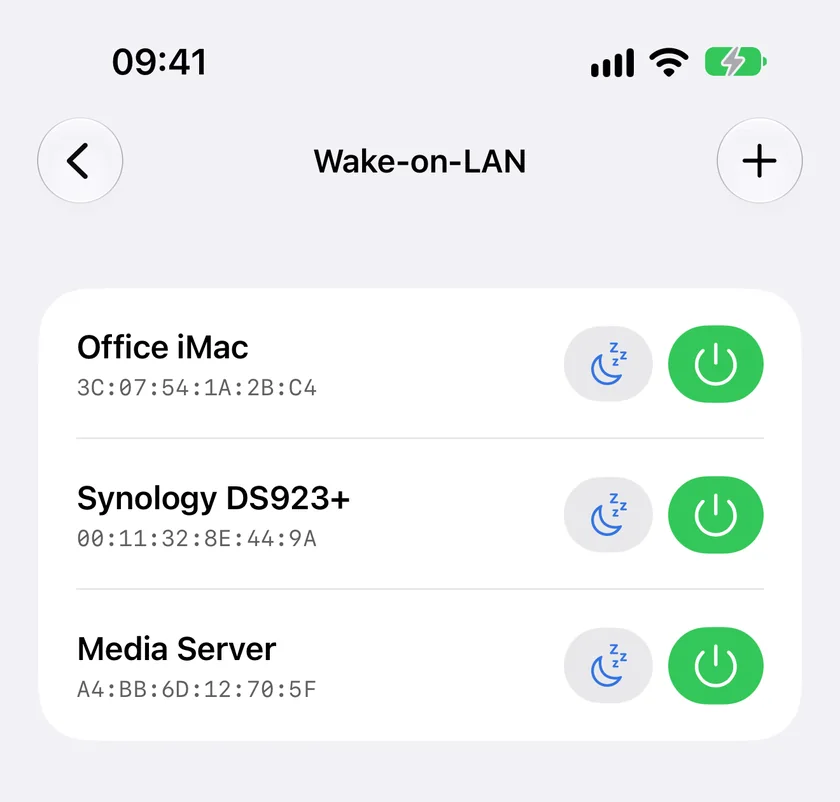
Port forwarding is not the answer on the iPhone alone. PingKit sends to whatever broadcast address you save, so from another Wi-Fi network a forwarded UDP port on your router can work, but it will not send its own packet over cellular at all, and a forwarded port is a door left open on your router for anyone who finds it.
The full walkthrough, including enabling WoL on the target machine's BIOS/UEFI and setting up port forwarding for remote wake, is in our step-by-step Wake-on-LAN guide.
The Bottom Line
Before comparing app interfaces, answer one question: do you need to wake a computer only when you are already home, or genuinely from anywhere? If it is the former, almost any WoL app works, including PingKit's free one. If it is the latter, you need something that gets the packet sent from inside your network: a forwarded port on your router, a relay, or a machine at home that sends it for you. PingKit does the last, with Guardian and a Mac running PingKit Agent.
Frequently Asked Questions
Can I use Wake-on-LAN over the internet, not just on my home WiFi?
Only if the app or your setup can reach your home network remotely, either through a port-forwarded WoL relay or a companion device already on the home network that relays the wake signal. Many basic WoL apps only work when your phone is on the same local network as the target computer.
What's the biggest difference between Wake-on-LAN apps?
Whether they can wake a computer only when you're on the same WiFi, or genuinely from anywhere via the internet. That single capability matters more than interface polish for most people who want this feature at all.
Does Wake-on-LAN need to be enabled on the computer first?
Yes. Wake-on-LAN must be enabled in the target computer's BIOS/UEFI or system settings, and the network adapter must support it, before any app on any phone can wake it.
Is PingKit's Wake-on-LAN feature free?
Yes, Wake-on-LAN is one of PingKit's free tools, alongside its other network diagnostics. Waking from anywhere through a Mac at home is part of Guardian.
Related Articles
- How to Wake Your Computer Remotely with iPhone
- How to Port Forward on Your Router
- How to Set a Static IP Address on Your Home Network
- 192.168.1.1 Login: How to Access Your Router
- Wake-on-LAN from a Mac: Setup That Works
- The Best Wake-on-LAN App for iPhone
- How PingKit compares to other network tools
- Wake-on-LAN Not Working From iPhone: The Failure Checklist
- Wake-on-LAN for Windows 11 From an iPhone: The Full Setup
Wake Any Computer, From Anywhere
PingKit's Wake-on-LAN works on your home WiFi out of the box, no ads, no subscription. With Guardian and a Mac at home running PingKit Agent, it wakes your machines from anywhere. Free to download.
Download PingKit Free