Guardian Plus adds Cert Monitor for 50 domains, alerts by email and webhook, ISO 27001 compliance PDF export, and scheduled and branded reports.
Try Free for 1 Week$9.99/month or $79.99/year on iPhone and iPad. On Mac, Guardian Plus is $4.99/month or $39.99/year. Cancel anytime. All 19 tools remain free.
Everything in Guardian, plus the tools that ops teams and security-conscious users have been asking for.
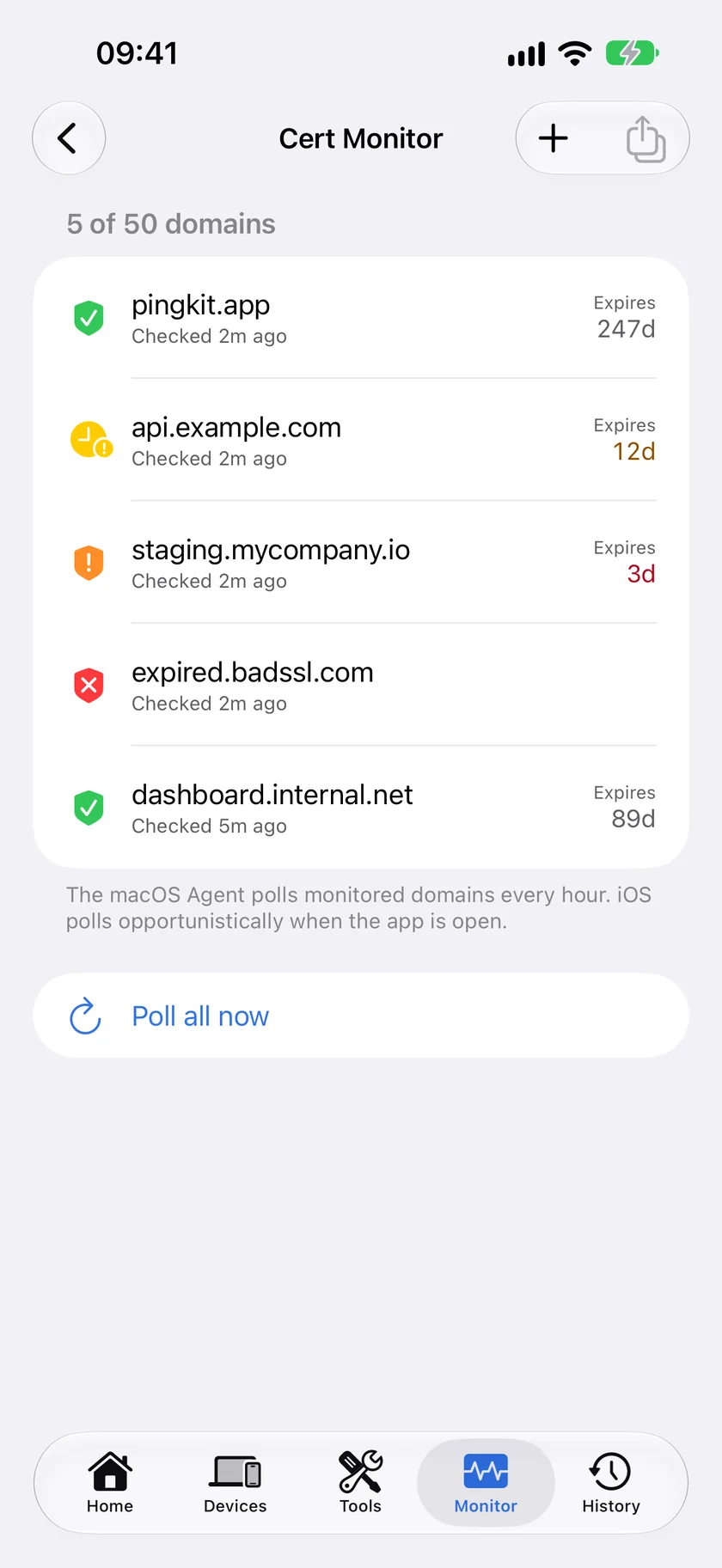
Add domains to your watch list. The Mac Agent checks their certificates every hour while the Mac is awake, the iPhone checks when you open Cert Monitor, and PingKit's backend sends the push: 30, 14, 7 and 1 day before a cert expires, or immediately if the chain fails validation. One domain is free, Guardian watches 5 and Plus watches 50.
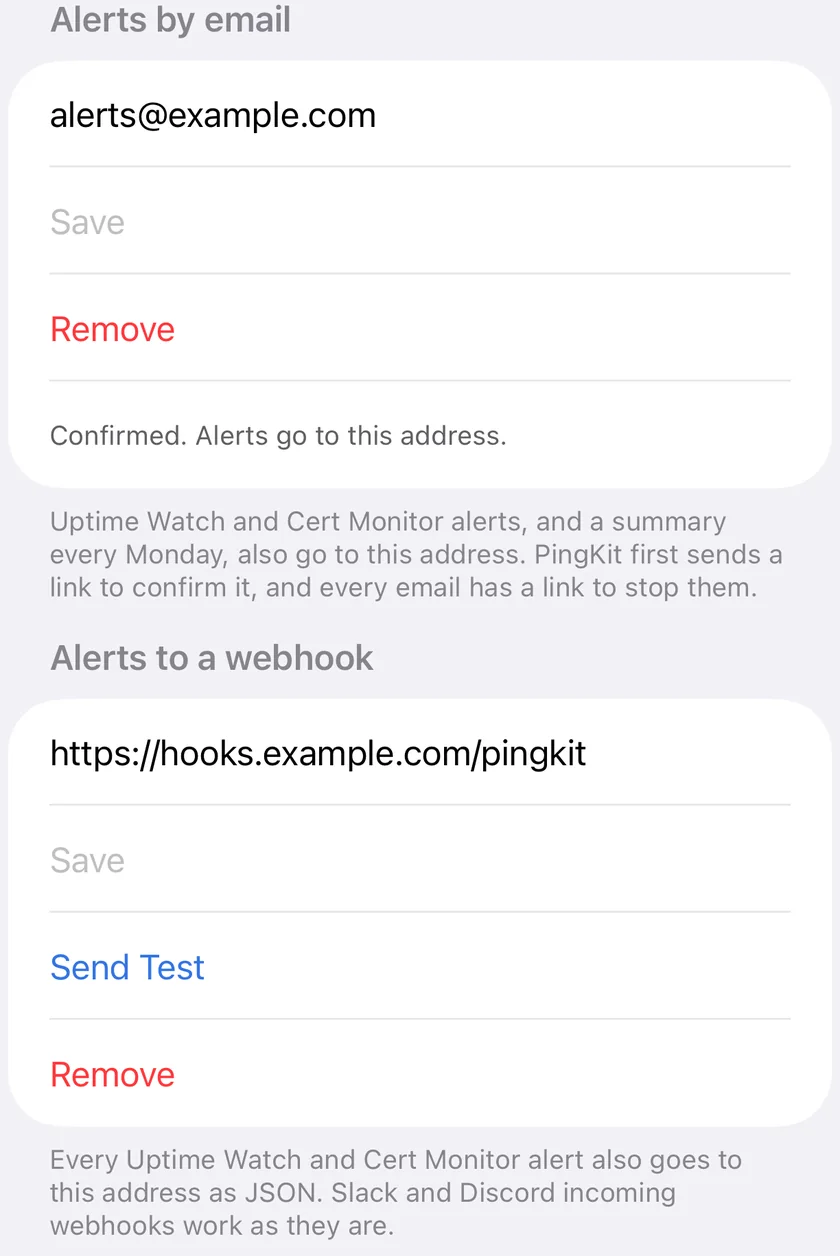
Every Uptime Watch and Cert Monitor alert can also go by email, to an address you confirm first, with a summary of the week every Monday and a link in every message to stop them. And to a webhook you set: each alert arrives as JSON, which a Slack or Discord incoming webhook accepts as it is. In the Mac Agent the webhook also receives the Mac's own alerts, such as a device joining or going offline and an internet outage.
Generate a timestamped PDF inventory of every monitored domain: subject, issuer, key algorithm and size, signature algorithm, chain validity, expiry and alternative names, citing ISO/IEC 27001:2022 controls A.5.37, A.8.15 and A.8.8. The file carries its own Ed25519 signature, so an auditor can confirm it was not edited.
Put your organisation's name and who the report is for on the network report, and have PingKit tell you when the next one is due. iOS does not let an app build a report while it is closed, so a schedule prepares the report the next time you open PingKit.
On iPhone, Guardian's gaming connection check runs for up to two hours. Guardian Plus adds four- and eight-hour sessions, eight being as long as a Live Activity can run, and a CSV export of your session history with each session's grade, latency, jitter, loss and lag under load. PingKit has to stay on screen while it measures. How Session Watch works.
Questions too large for the model on your iPhone to hold on its own are answered by Apple Private Cloud Compute, which Guardian Plus includes along with everything else in Guardian. The answers written on the device itself are free and unlimited on every tier.
All 19 tools are free. Pick the monitoring level that fits your needs.
| Free | Guardian | Guardian Plus | |
|---|---|---|---|
| 19 network tools | ✓ | ✓ | ✓ |
| AI answers written on your device by Apple Intelligence | Unlimited | Unlimited | Unlimited |
| Apple Private Cloud Compute, for questions too large for your device to hold alone | No | ✓ | ✓ |
| PingKit's own service, the last resort when neither can answer | 15 a week | ✓ | ✓ |
| Mac Agent tools, monitoring and alerts on the Mac | ✓ | ✓ | ✓ |
| Mac Agent data and alert history on your iPhone | ✕ | ✓ | ✓ |
| Uptime Watch | 1 URL | 10 targets, every 5 min | 10 targets, every 5 min |
| Cert Monitor | 1 domain | 5 domains | 50 domains |
| Alerts by email and to a webhook | ✕ | ✕ | ✓ |
| Router mode on iPhone: port forwarding audit | ✕ | ✓ | ✓ |
| Session Watch on iPhone: regions, 2-hour sessions, lag under load, where the lag is | ✕ | ✓ | ✓ |
| Session Watch on iPhone: 4- and 8-hour sessions, CSV export of the history | ✕ | ✕ | ✓ |
| ISO 27001 PDF export | ✕ | ✕ | ✓ |
| Apple Watch complication | ✓ | ✓ | ✓ |
| Branded reports and due-date reminders | ✕ | ✕ | ✓ |
| Price on iPhone and iPad | Free | $2.99/mo $2.99/mo on Mac |
$9.99/mo $4.99/mo on Mac |
The Apple Watch complication is free on every tier, including the free one. It is a glanceable status face, green, amber or red from the last check your iPhone ran, not an alerting channel: cert expiries, endpoint failures and new-device notices go to your iPhone.
One subscription. Every premium feature. 1-week free trial on every plan.
Upgrade to Guardian Plus at any time from the app. On the device you subscribed on, the App Store prorates what you have already paid. Bought on your other device, Guardian Plus is a separate subscription, so cancel the first one where you bought it. All 19 iOS tools remain free regardless of subscription tier. Not yet on Guardian? Here is what it includes.
Add a domain to your watch list. The Mac Agent checks it every hour while the Mac is awake; the iPhone checks it when you open Cert Monitor. Each check reads the certificate chain, expiry date, subject, issuer, alternative names, key size and signature algorithm and reports the result to PingKit's backend, which sends a push notification to the iPhone at 30, 14, 7 and 1 days before expiry and immediately if the chain fails validation. Guardian Plus can send the same alerts by email and to a webhook, which is how a Mac's list reaches you away from the Mac, and tells you once if a Mac has sent no reading for 18 hours. One domain is free, Guardian raises the limit to 5 and Guardian Plus to 50.
Uptime Watch checks each target from Cloudflare's network: a URL, or on Guardian and Guardian Plus also a TCP port on a host you name. A URL check sends a HEAD request (a GET when a keyword is set) and repeats it as a GET if the server refuses HEAD, follows redirects, and times out after 10 seconds; any final status from 200 to 399 counts as up, unless, on Guardian or Guardian Plus, you add an exact status code to expect or a keyword the page must contain. When a target fails, you get a push notification on your iPhone, and another when it recovers; Guardian Plus can send both by email and to a webhook of your own as well. The checks run on PingKit's backend, so they continue while your phone and your Mac are off; the iPhone does nothing in the background. The target has to be reachable from the internet. One URL is free for as long as you like, checked every hour with 7 days of history; Guardian and Guardian Plus watch up to 10 targets every five minutes, with 30 days of history and a response-time chart. Your monitored targets and their results are stored on PingKit's backend to drive those alerts; the rest of your data stays on-device and syncs via your private iCloud.
The compliance export is a timestamped PDF inventory of every domain you monitor: subject, issuer, port, public key algorithm and size, signature algorithm, chain validity, expiry date, subject alternative names, when it was last checked and how long it has been monitored, plus your Uptime Watch targets if you have any. It cites ISO/IEC 27001:2022 Annex A controls A.5.37, A.8.15 and A.8.8. The file is signed with an Ed25519 key generated on the exporting device and the public key is printed in the footer of every page, so an auditor can confirm it has not been edited. It exports from the Mac Agent's Reports pane and from the iPhone.
Your monitored domains and their latest certificate and uptime results are stored on PingKit's own backend (a Cloudflare Worker) so alerts and push notifications reach you reliably. Uptime Watch checks run there, so they continue while your devices are asleep; certificate checks run on your Mac (hourly while it is awake) or your iPhone (when you open Cert Monitor), and the backend sends the expiry alerts from those results. That backend holds only the domains you choose to monitor, their check results and, if you turn on email or webhook alerts, the address they go to, nothing else, and it is never sold or shared. All of your other data (device inventory, scans, and diagnostics) stays on the device that collected it, with one exception: the Mac Agent's devices, timeline, alerts and speed tests reach your iPhone, only through your private iCloud. See our Privacy Policy for the full breakdown.
Guardian ($2.99/mo or $24.99/yr, on iPhone and on Mac) puts the Mac Agent's monitoring and alert history on your iPhone, watches up to 10 URLs with Uptime Watch and 5 domains with Cert Monitor, charts trends per network, syncs scheduled speed test results, and adds AI answers from Apple Private Cloud Compute. Guardian Plus ($9.99/mo or $79.99/yr on iPhone and iPad, $4.99/mo or $39.99/yr on Mac) adds Cert Monitor for up to 50 domains instead of 5, every Uptime Watch and Cert Monitor alert by email and to a webhook, the signed ISO 27001 compliance PDF, and scheduled and branded reports. A subscription bought on either the iPhone or in the Mac Agent unlocks the same tier on both through iCloud. Every tier, side by side with what stays free, is on the PingKit pricing page.
Yes. Every Guardian Plus plan, monthly and yearly, on iPhone and iPad and on Mac, includes a 1-week free trial. Set up Cert Monitor, configure Uptime Watch, and explore every feature. Cancel any time during the trial and you will not be charged.
Download PingKit and start your free Guardian Plus trial today.
Download Free on the App StoreRequires iOS 17.0 or later. All 19 tools free, forever. On a Mac, get PingKit Agent on the Mac App Store: Plus is $4.99/mo there.