The optional subscription behind PingKit's monitoring. $2.99 a month or $24.99 a year on iPhone and on Mac, with a 1-week free trial. Here is exactly what it unlocks, what it does not, and what stays free without it.
Download Free on the App StoreOr get PingKit Agent on the Mac App Store
Free to download. Guardian is $2.99 a month or $24.99 a year, with a 1-week free trial on both. Cancel anytime.
Every one of PingKit's 19 tools on iPhone and iPad is free, with no ads, no account and no usage limit, among them the LAN scanner, port scanner, ping, traceroute, MTR, DNS lookup, WHOIS, HTTP and SSL inspection, speed test, Wake-on-LAN, Bonjour browser, subnet calculator, Connection Monitor and the security checkup. History is free and unlimited.
So is the Mac Agent. Download it from the Mac App Store and it monitors your network from the menu bar, raises alerts on the Mac, runs scheduled speed tests and builds the network report, none of which needs a subscription. One Uptime Watch URL and one Cert Monitor domain are free permanently on either platform, though the push notification itself always lands on the iPhone: macOS has no push channel for these two. The AI assistant is free as well: the answers written on your device itself are unlimited, and PingKit's own service adds a pool of 15 interactions a week, capped at 5 a day, for the questions your device cannot answer alone.
Guardian is the layer that watches your network for you and brings the result to your iPhone. Everything below is checked against the app: if it is not in this list, Guardian does not do it.
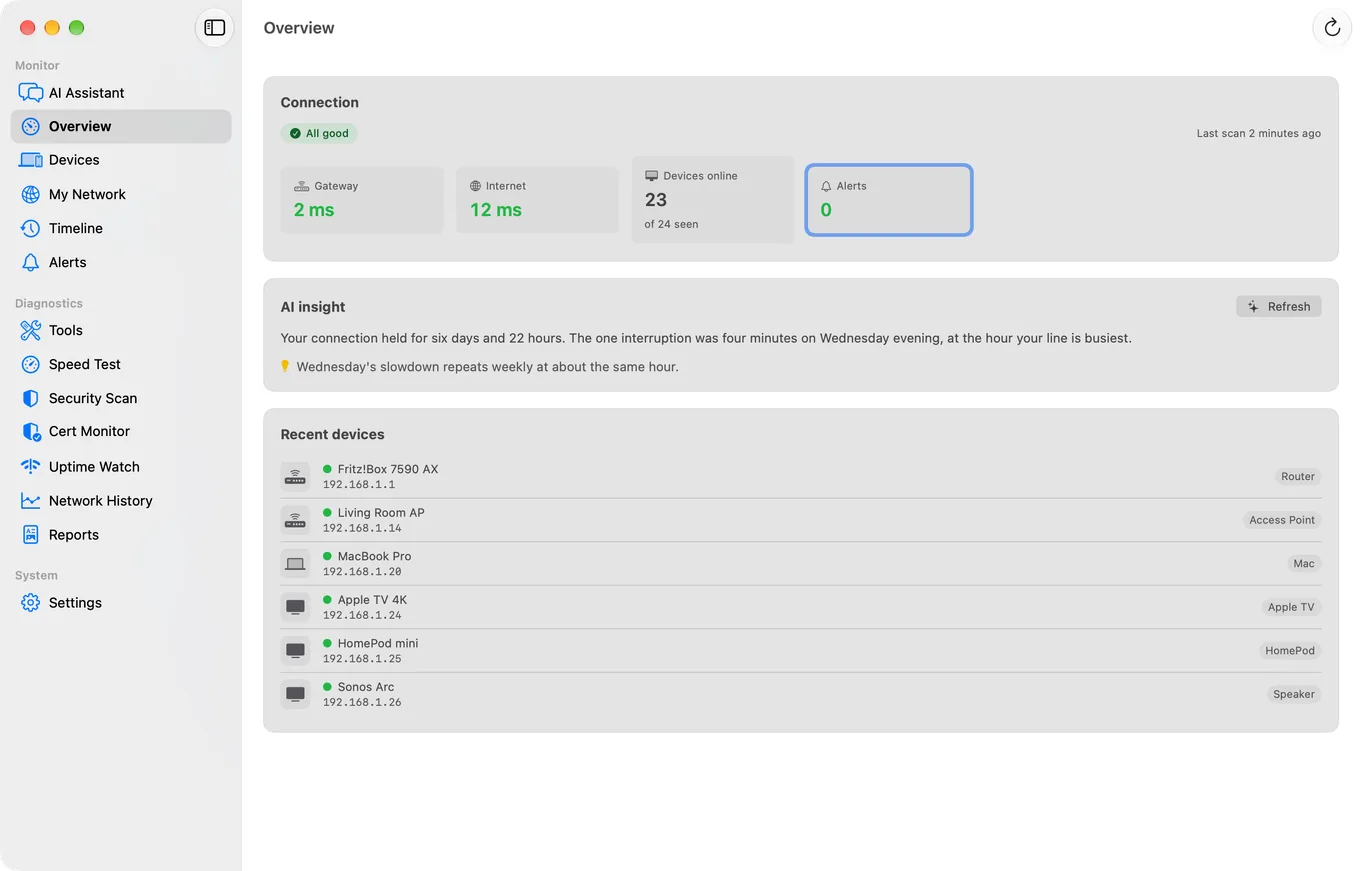
The Agent's device list, timeline and alert history sync to your iPhone through your private iCloud, so you can see what a Mac that stays on at home has recorded, wherever you are. The alerts themselves reach your phone free: an internet drop from the start, a new device once the Agent has spent its first day learning your network, and a device going quiet once you switch on its Device Offline alert, which is off by default.
Checks every five minutes from Cloudflare's network, with a push when a site goes down and another when it recovers. Guardian adds TCP port and keyword checks and 30 days of response times; one URL checked hourly is free. On iPhone and on Mac.
A push 30, 14, 7 and 1 days before a TLS certificate expires, and immediately if the chain fails. One domain is free; Guardian watches five, and Guardian Plus fifty.
Your Mac Agent tests your ISP on a schedule and the results appear on your iPhone, so the slow hour you keep missing is on record.
Latency, speed, jitter and security score charted by day for every network you use, with the direction of travel once there are four days of readings.
On iPhone, the Security Scan lists every camera it can identify on your Wi-Fi, how it knew, what each serves, and whether your own public address answers on one of its ports that the check tries, next to the devices you have not named.
On iPhone, your router's port forwarding in plain language, with removal. The status view is free. How Router mode works.
On iPhone, your connection graded A to F for real-time games against ten cloud regions, for up to two hours (eight with Guardian Plus) with a Live Activity, with a lag-under-load test, where the lag is and a history of your sessions. Foreground only. The one-minute check is free. How Session Watch works.
What is new, resolved or worse since the last checkup, which device each finding belongs to, a Fix It walkthrough for your router brand, and an optional re-check when you open the app.
Smart Diagnostics names the failing segment: this device, inside your network, between your router and your ISP, your DNS settings, or beyond.
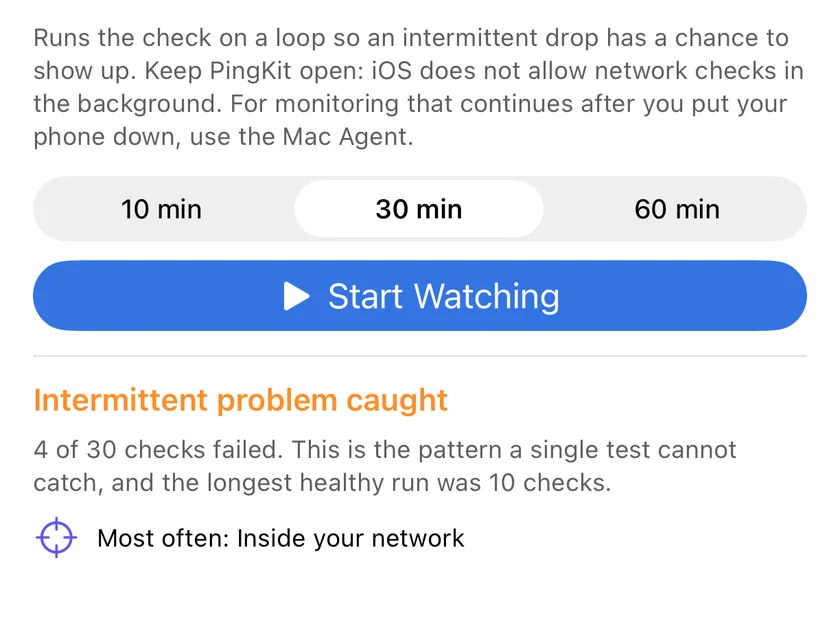
Repeats the diagnostic for 10, 30 or 60 minutes and separates an intermittent fault from a constant one. Foreground only, by design.
The assistant, security explanations, remediation steps and scan summaries reach Apple Private Cloud Compute for the questions too large for the model on your iPhone to hold on its own, in 27 languages, and Guardian's cloud AI suggests a category for devices that signature matching cannot label.
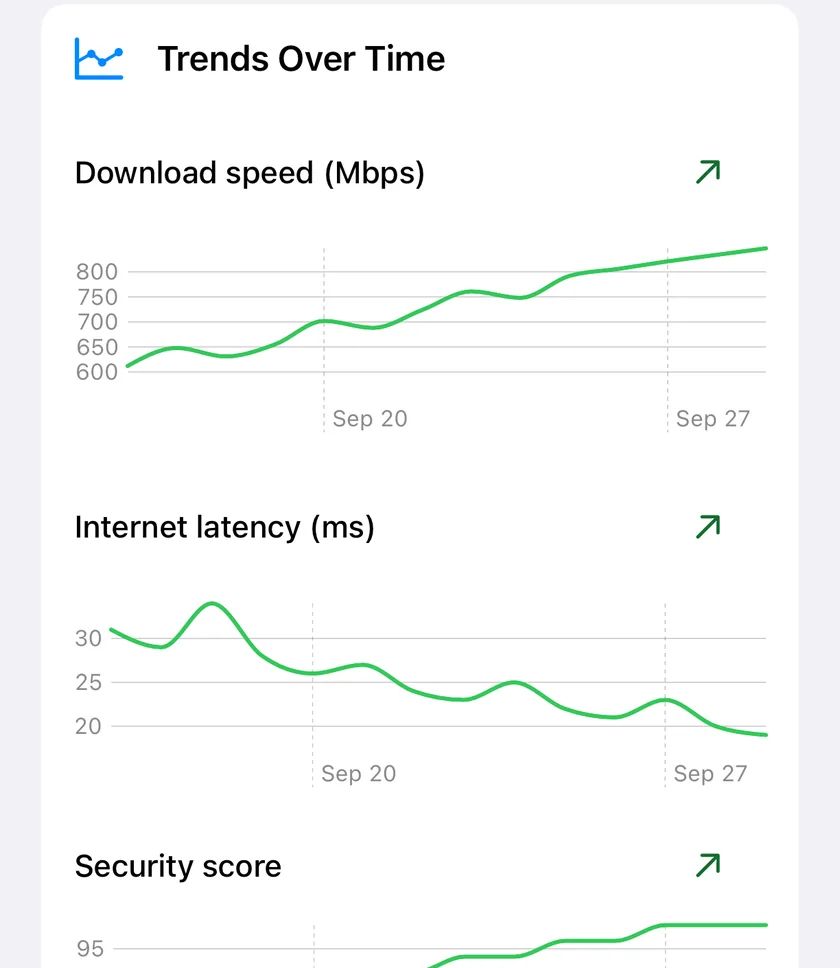
Guardian's iPhone features are the ones that only make sense across days. Trends charts latency, speed, jitter and security score per network by day, and states the direction only once four days of readings exist. Compared with normal judges a reading against a per-network baseline built from a median of at least five readings, with an absolute floor per metric so a tiny movement is not reported as a large one. The security checkup remembers its last run on the same network and tells you what is new, what is resolved and how the score moved.
None of this needs a Mac. It needs you to open the app now and then, because the readings come from the tools you run.
A speed test or a ping answers "what is happening now". Watch Mode repeats the whole Smart Diagnostics flow for 10, 30 or 60 minutes, at least 30 seconds apart, and reports how many checks failed and the longest healthy run, which is the difference between "the Wi-Fi is bad" and "the Wi-Fi drops for 40 seconds every 8 minutes". Fault localisation then names the segment: this device, inside your network, between your router and your ISP, your DNS settings, or beyond. Both run while the app is open; iOS does not let an app keep probing in the background, and PingKit does not pretend otherwise.
iOS never monitors in the background. Every alert that reaches your iPhone comes from the Mac Agent or from PingKit's backend on Cloudflare. With no Mac and no Uptime Watch target, Guardian will not wake your phone with anything.
Uptime Watch checks from the internet, every five minutes on Guardian and hourly for the free URL, with no one-minute checks and no custom interval. A NAS or a Pi that only exists on your LAN cannot be a target; the Agent's device-offline alert is the tool for that, once you switch it on in the Agent's Settings, since it is off by default.
Cert Monitor beyond five domains, alerts by email and to a webhook, the signed compliance PDF and scheduled branded reports are Guardian Plus, not Guardian.
On the Mac itself, Guardian changes what the Agent watches and who it tells: Uptime Watch rises from one URL to ten, checked every five minutes, Cert Monitor from one domain to five, the Agent shows its own notification when a watched site goes down or recovers or a certificate nears expiry, it can send your iPhone a morning briefing, and AI answers gain Apple Private Cloud Compute. Every other Agent feature is free there, except the few that belong to the tier above: Network History, the AI-written weekly summary, alerts by email and to a webhook, scheduled wake, and sleep, restart and shut down over SSH are Guardian Plus.
Guardian costs the same on both platforms. Guardian Plus does not, so the table is worth a look before you subscribe.
| Plan | iPhone and iPad | Mac Agent |
|---|---|---|
| Guardian monthly | $2.99, 1-week free trial | $2.99, 1-week free trial |
| Guardian yearly | $24.99, 1-week free trial | $24.99, 1-week free trial |
| Guardian Plus | $9.99 a month or $79.99 a year, 1-week free trial on both | $4.99 a month or $39.99 a year, 1-week free trial on both |
A subscription bought on either device unlocks the same tier on both through iCloud, so buy it wherever is convenient. If you hold a subscription on each, the higher tier wins on both.
Guardian is the right tier for a home or a small office: the Agent on your phone, ten watched sites, five watched certificates, the trend charts and Apple Private Cloud Compute answers. Guardian Plus is for people who manage TLS certificates, answer to an auditor or want alerts where a team will see them: Cert Monitor for 50 domains instead of five, every Uptime Watch and Cert Monitor alert by email and to a webhook such as a Slack channel, a compliance PDF that carries its own Ed25519 signature, and scheduled, branded reports. It is $9.99 a month or $79.99 a year on iPhone and iPad and $4.99 a month or $39.99 a year on Mac. Read what Plus adds, or see the free tier, Guardian and Plus side by side on the PingKit pricing page.
Every problem on this list has a free step and a Guardian step, and each guide says which is which.
Yes. All 19 tools, unlimited history, the Mac Agent and everything it does on the Mac, one Uptime Watch URL, one Cert Monitor domain and 15 AI interactions a week are free, with no ads and no account. Guardian is optional.
No. Uptime Watch for ten URLs, Cert Monitor for five domains, the trend charts, the checkup history, Watch Mode, fault localisation and Apple Private Cloud Compute answers are all on the iPhone. The Mac Agent features need a Mac that stays on; without one, those cards in the Monitor tab simply stay empty.
Uptime Watch rises from one URL to ten, checked every five minutes, and Cert Monitor from one domain to five. The Agent shows its own notification when a watched site goes down or recovers or a certificate nears expiry, and can send your iPhone a morning briefing of the night. The AI gains Apple Private Cloud Compute for questions too large for the model on your Mac to hold on its own. Monitoring, alerts, scheduled speed tests, the network report and iCloud sync are all free on the Mac; Guardian, bought on either device, is what lets the iPhone read them. A few Agent features sit above Guardian rather than inside it: Network History, the AI-written weekly summary, alerts by email and to a webhook, scheduled wake, and sleep, restart and shut down over SSH are Guardian Plus.
Yes. The subscription is written to your private iCloud and the Mac Agent reads it. The reverse is true as well: a subscription bought inside the Mac Agent unlocks the same tier on your iPhone, and whichever device holds the higher tier sets it for both.
Yes. Guardian monthly and yearly carry a 1-week free trial on iPhone and on Mac, and so does every Guardian Plus plan. Cancel during the trial and you are not charged.
Download PingKit, open the Monitor tab, and start the trial when you want your network watched for you.
Download Free on the App StorePingKit Agent on the Mac App Store
Requires iOS 17.0 or later. The Mac Agent requires macOS 15 or later. All 19 tools free, forever.