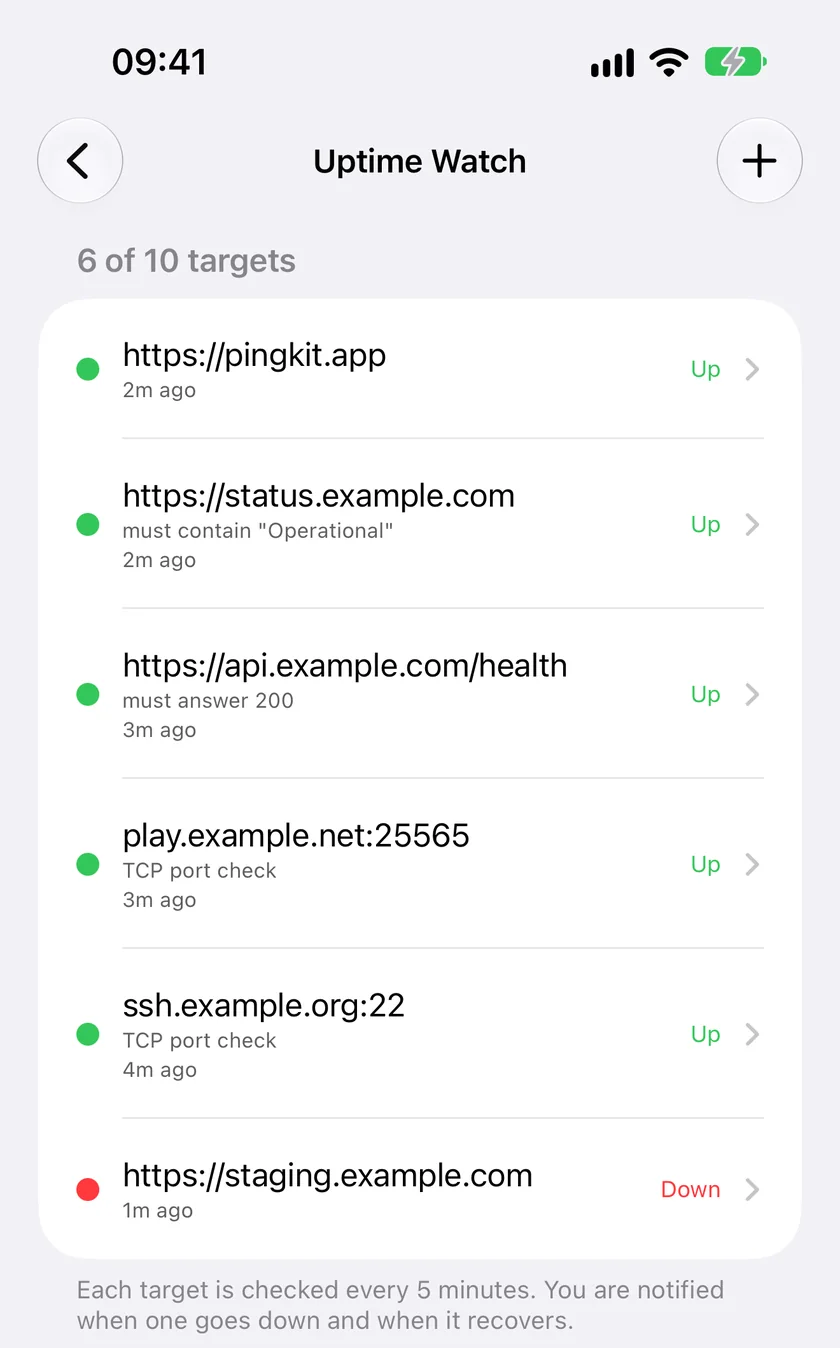
Uptime Watch checks your website or server from Cloudflare's network and sends a push to your iPhone when it goes down and when it comes back. One URL is free, checked every hour, for as long as you like. Guardian watches ten sites or ports every five minutes.
Download Free on the App StoreOr get PingKit Agent on the Mac App Store
Free to download. One URL is free with push. Guardian is $2.99 a month or $24.99 a year, with a 1-week free trial on both. Cancel anytime.
Add a URL. PingKit's backend on Cloudflare's network sends it an HTTP request with a 10-second timeout and records the status code and the response time: once an hour on the free tier, every five minutes with Guardian. Redirects are followed, and a final 2xx or 3xx counts as up; a 4xx, a 5xx or no answer at all marks the target down, and a target that goes from up to down sends a push notification to your iPhone. When the next check succeeds, you get a second notification saying it recovered. The free tier keeps seven days of results and Guardian keeps thirty.
The probe says who it is, with a user agent that names PingKit Uptime Watch, and it asks with a lightweight HEAD request first. If a server refuses HEAD, as some firewalls and hosting platforms do, the same check is retried as an ordinary GET, so a site that works in a browser does not read as down because of how it was asked.
Nothing runs on your phone. The check happens whether your iPhone is in a drawer, your Mac is asleep, or both are off, which is what separates an uptime monitor from the Connection Monitor tool that watches this device's own connection while the app is open.
The probe comes from Cloudflare, not from your network, so it sees your site the way a visitor does: DNS, TLS and all. Hourly on the free tier, every five minutes with Guardian.
Two notifications per incident, not a stream. You hear when it fails and when it is back.
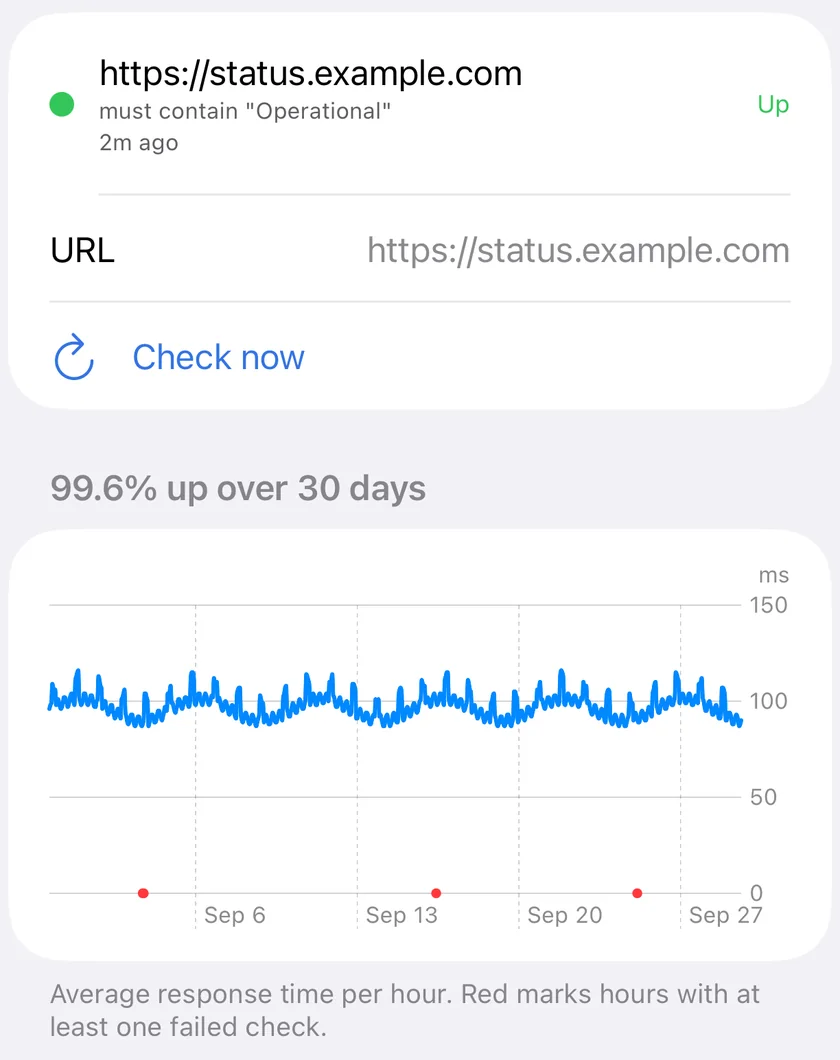
Average response time per hour, with the hours that had a failed check marked in red, so a flaky host shows as flaky rather than as one bad morning. Seven days free, thirty with Guardian.
No account to create and nothing to host. The URL and its results live on PingKit's backend; everything else in the app stays on your device.
PingKit has three ways to watch something, and people mix them up. Connection Monitor watches this iPhone's own connection, live, while the app is open. The Mac Agent watches your home or office network for as long as the Mac is awake: which devices are there, whether the internet is up, how fast it is. Uptime Watch watches a public website or server from the internet, on a schedule, with no device of yours involved.
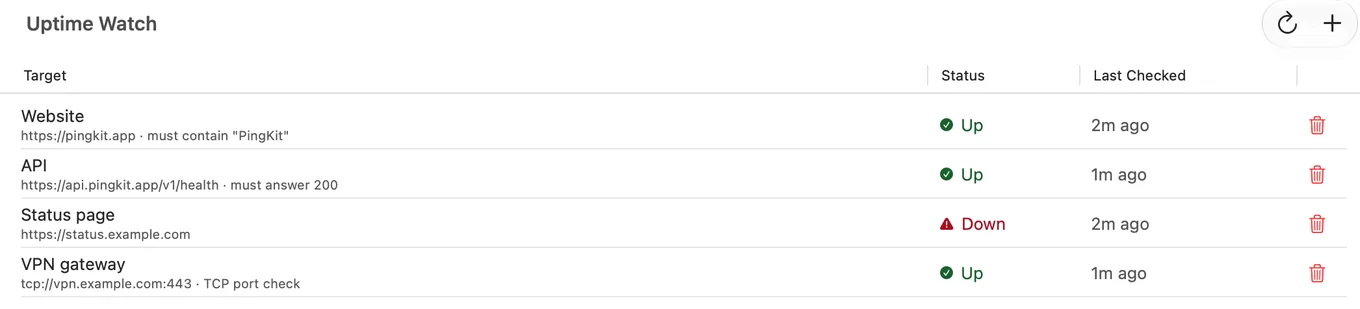
The Mac Agent has an Uptime Watch pane of its own, and a target added there is checked from Cloudflare exactly like one added on the iPhone, on the same schedule your plan gives it. Check now runs an extra probe on demand. Two things are still worth knowing. Each device registers its own list with the backend, so a URL added on the Mac is separate from one added on the iPhone. And the push is the phone's: macOS cannot receive a push notification from PingKit's backend. With Guardian, the Mac Agent reads its targets' state every five minutes while it is running and shows a notification on the Mac when one goes down or comes back; without Guardian the Mac shows the change in its pane only. The notification that finds you away from the Mac goes to the iPhone, so add the target there too if you want to be told wherever you are.
The free tier answers one question about one URL, once an hour: is it answering? Guardian turns that into a small monitor for the handful of things you actually run.
| Free | Guardian | |
|---|---|---|
| Targets | 1 | 10 |
| How often each is checked | Every hour | Every 5 minutes |
| What a target can be | A website (HTTP or HTTPS) | A website, or a TCP port on a server |
| Page must contain some text | No | Yes, exact and case-sensitive |
| Require an exact status code | No | Yes |
| History and response-time chart | 7 days | 30 days |
| Push when down and when recovered | Yes | Yes |
TCP port checks. Not everything worth watching speaks HTTP. A port check opens one connection to the host and port you name, then closes it, which is enough to know that SSH on your server, a game server you host, or a mail or database port is accepting connections. It is one connection to one port you chose, on a server you run, every five minutes. Port 25 is the exception: Cloudflare refuses outbound mail connections, so a check there could only ever fail. How to monitor a server port from your iPhone walks through it.
Keyword checks. A server can answer 200 while it serves a hosting provider's placeholder, or while a status page says "Major outage". Add the text a healthy page contains and the check fails when it goes missing. The match is exact and case-sensitive, so "Operational" and "operational" are different checks. Watching a status page for a word covers the patterns that work.
Expected status. By default any final 2xx or 3xx is up, after redirects are followed. If an endpoint should always return exactly 200, or exactly 204, you can require that code and anything else counts as down.
Thirty days, charted. Each target's detail view draws the average response time per hour across the last thirty days, with the hours that had a failed check marked in red, on the iPhone and in the Mac Agent's pane.
When you upgrade, the targets you already have speed up on the next round of checks; if a subscription lapses they go back to hourly and are kept.
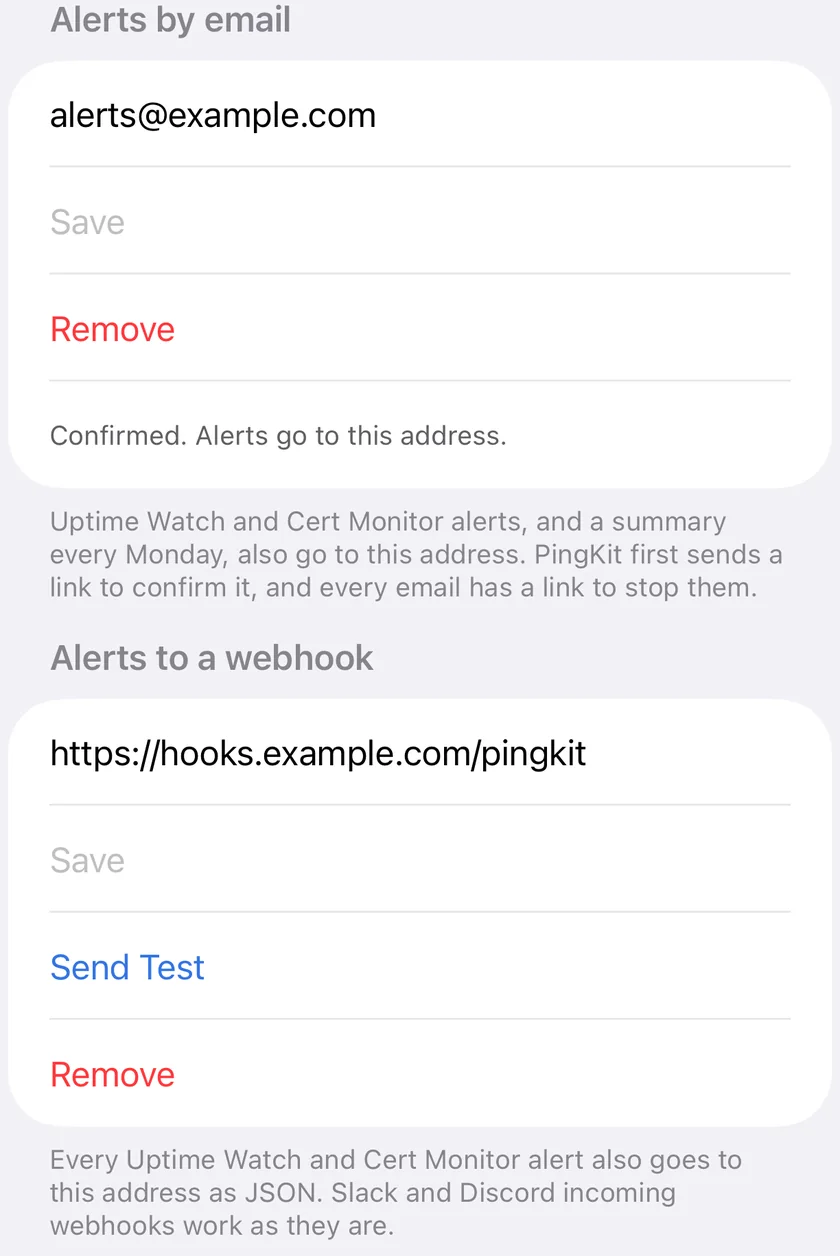
Guardian Plus: email and webhooks. Plus checks the same ten targets on the same five-minute schedule, and sends every down and recovery alert to two more places. By email, to an address you confirm first through a link PingKit sends, with a summary of the week every Monday and a link in every message to stop them. And to a webhook you set: an HTTPS address that receives each alert as JSON, which a Slack or Discord incoming webhook accepts as it is. Both are set per device, on the iPhone in the Uptime Watch screen and in the Mac Agent under Settings, Alerts, and both carry Cert Monitor's alerts too.
It checks from the internet, so the target has to be reachable from the internet. A NAS, a Pi or a printer that only has a private address cannot be an Uptime Watch target. The Mac Agent's device-offline alert, off by default and turned on in its Settings, is the tool for those, and this guide walks through both.
It checks a status, a keyword or a port, not a whole application. There is no login step, it does not run the page's JavaScript, and it does not check DNS records or answer pings. A site that turns automated requests away with a 403 even on GET will show as down, and that is worth knowing about the site.
The interval is set by your plan: one hour free, five minutes with Guardian. There are no one-minute checks, no checks from several regions, no public status page, no SMS and no on-call rota, and alerts by email or to a webhook need Guardian Plus. If you need those, that is what UptimeRobot and its peers are for, and PingKit is not trying to replace them.
One URL is free, permanently, checked every hour with the same push notifications and seven days of history. PingKit Guardian raises the limit to ten targets, checks them every five minutes, adds TCP port and keyword checks, and keeps thirty days. Guardian is $2.99 a month or $24.99 a year, on iPhone and iPad or in the Mac Agent, and both plans carry a 1-week free trial. A subscription bought on either the iPhone or in the Mac Agent unlocks Guardian on both through iCloud.
Guardian also puts the Mac Agent's monitoring on your phone, charts trends per network and adds AI answers from Apple Private Cloud Compute.
https://. The target must answer with a 2xx or 3xx status; a 4xx or a 5xx is reported as down, which is a real finding about that site rather than a bug.Yes. PingKit's Uptime Watch monitors one URL free of charge, permanently, with hourly checks, seven days of history and push notifications when it goes down and when it recovers. There is no trial clock on the free URL. Guardian raises the limit to ten targets checked every five minutes.
Yes. The check runs on PingKit's backend on Cloudflare's network, not on your phone or your Mac, so it continues while both are off. The notification is delivered when your phone is next reachable.
Only if it is reachable from the internet, for example through a domain you have pointed at it. A device that has only a private address on your home network is invisible to Uptime Watch; the free Mac Agent's device-offline alert covers that case and reaches your iPhone too, once you turn it on in the Agent's Settings, since it is off by default.
Once an hour on the free tier and every five minutes with Guardian or Guardian Plus. The interval follows your plan and cannot be set by hand. If you need checks every minute, from several regions, or a public status page, use a dedicated service alongside PingKit.
Yes, with Guardian. Add the text the page must contain, and a check that finds the server answering but the text missing counts as down. The match is exact and case-sensitive, and it reads the first 256 KB of the page. You can also require an exact status code instead of any success or redirect.
Yes, with Guardian. A TCP port check opens one connection to the host and port you name and closes it, so it answers whether that service is accepting connections. The host has to be reachable from the internet, and port 25 is not supported because Cloudflare refuses outbound mail connections.
On PingKit's own backend, a Cloudflare Worker, which needs them to run the checks and send the notifications. It holds the URLs and ports you add, the names you give them, any keyword or status code you ask it to look for, the push token it notifies you with, up to 30 days of results and, if you turn them on with Guardian Plus, the email address and webhook URL your alerts also go to, nothing else. Device inventory, scans and diagnostics stay on your device and sync only through your private iCloud.
Download PingKit, open the Monitor tab, and add the URL you keep checking by hand. Guardian watches ten, every five minutes.
Download Free on the App StorePingKit Agent on the Mac App Store
Requires iOS 17.0 or later. All 19 tools free, forever.