Get an iPhone Alert When Home Assistant Goes Offline
Short version. Home Assistant cannot notify you that it has stopped, because the thing that would send the notification is the thing that stopped. You need a watcher outside it, and which one depends on how you reach your instance. If it has a public hostname, a Nabu Casa address or your own domain, PingKit's Uptime Watch checks it from Cloudflare and pushes to your iPhone when it stops answering and again when it recovers. One URL is free, permanently, checked hourly. Guardian watches ten, every five minutes. If the instance is LAN-only, no internet-side checker can see it, and the answer is a Mac on the same network running the free PingKit Agent.
A Monitor Inside the Thing Being Monitored Is Not a Monitor
Home Assistant has excellent notification support, and people quite reasonably try to use it to tell them when Home Assistant is unhealthy. It works right up to the failure that matters: the container stops, the SD card dies, the Pi loses power, the host reboots into a broken state. Then nothing sends anything, and the first you know is when a light does not come on.
The fix is structural, not clever. Something outside the instance has to check it and alert you. There are two shapes of that, and the right one depends entirely on whether your instance is reachable from the internet.
Option 1: Your Instance Has a Public Hostname
This covers Nabu Casa Home Assistant Cloud, a DuckDNS or other dynamic DNS name with a port forwarded, a reverse proxy on your own domain, or a Cloudflare Tunnel.
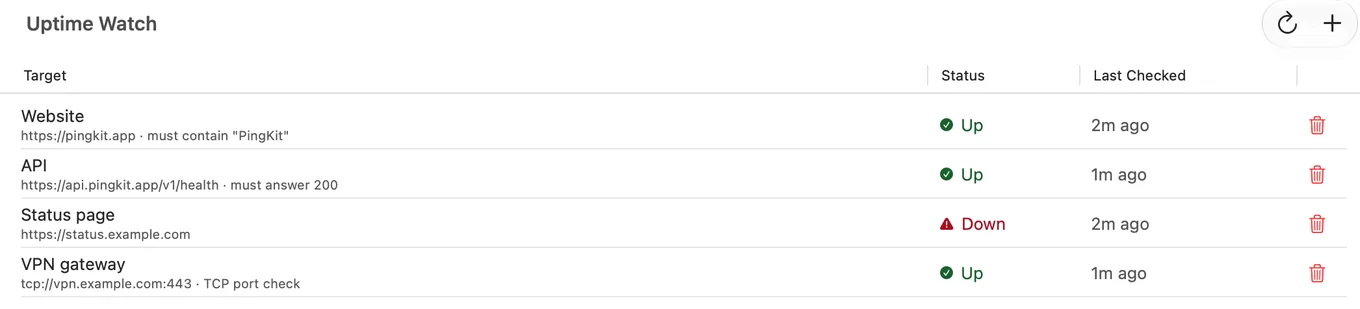
In PingKit, open the Monitor tab and add the address to Uptime Watch. What happens then is worth knowing precisely rather than vaguely:
- The check runs every five minutes with Guardian and hourly on the free tier, from Cloudflare's network, not from your phone. Your phone can be off.
- It is an HTTP request with a 10-second timeout, following redirects. If a server refuses the first lightweight request, the check retries as a normal GET rather than calling it down.
- Any final status from 200 to 399 counts as up. Anything else, or a timeout, counts as down. With Guardian you can also require a keyword on the page or an exact status code.
- When the state changes, from up to down or from down to up, you get a push notification on your iPhone. Both directions, so you are told when it comes back.
- Results are kept for 7 days on the free tier and 30 days with Guardian, with an hourly response-time chart, so you can see the pattern rather than just the last event.
One URL is free, permanently. Guardian watches ten, and a target can also be a TCP port on a public host. One target is enough for a single Home Assistant instance; ten is what you want once you are also watching a NAS web interface, a reverse proxy, a status page and a personal site.
Two things to understand before you trust it. The worst case between the failure and the alert is about five minutes with Guardian and about an hour on the free tier; this is a "tell me it broke" service, not a one-minute pager. And because it follows redirects and accepts anything under 400, a login page that answers correctly counts as up. That is usually what you want, since it proves the web server and the tunnel are alive, but on its own it means Uptime Watch is telling you "the address answers", not "Home Assistant is healthy". With Guardian, a keyword the real page must contain (the check is case-sensitive and exact) narrows that gap.
Uptime Watch is free for one URL, permanently, push notifications included. Get PingKit for iPhone
Option 2: Your Instance Is LAN-Only
If Home Assistant lives at a private address with no port forwarding and no tunnel, no internet-side checker can reach it, and that includes Uptime Watch. There is no way around this: a private address is not routable from Cloudflare, and it should not be.
What can see it is something on the same network. The free PingKit Agent for Mac scans the network every five minutes and keeps a device list. When the machine running Home Assistant has been unseen for fifteen minutes, the Agent marks it offline, raises a Device Offline alert and records a timeline entry. Device Offline alerts are off by default: turn the Device Offline toggle on in the Agent's Settings under Device Alerts and, until the next Agent update, set Offline scans before alert, one section below under Alert Debouncing, to 1. That alert reaches your iPhone through your own private iCloud with no subscription; PingKit Guardian adds the Agent's history to the iPhone app.
The distinction to keep straight is what each one proves. The Agent proves the host is present on the network. Uptime Watch proves the service answers an HTTP request. A host that is up with Home Assistant crashed will pass the first and fail the second, which is a good argument for using Uptime Watch even on a LAN-only setup if you can give it any public hostname at all.
Option 3: Both, Which Is What Most People Should Do
If your instance is reachable publicly, run both. They fail differently, and between them they cover the three outages that actually happen:
| What broke | Uptime Watch | Agent Device Offline |
|---|---|---|
| The host lost power or crashed | Reports down | Reports offline |
| Home Assistant stopped, host still running | Reports down | Nothing, the host is still there |
| Your home internet dropped | Reports down, correctly, since the service is unreachable | Nothing about the host, but the Agent raises Internet Down separately |
That third row is the reason to have the Agent's Internet Down alert as well: it is what distinguishes "my server died" from "my broadband died", and without it every outage looks the same from outside.
Setting It Up
- Install PingKit on the iPhone. Open the Monitor tab.
- Under Uptime Watch, add your instance's public address. Give it a label you will recognise in a notification at 3am.
- Allow notifications when iOS asks. Without that permission there is nothing to deliver.
- If you have a Mac that stays on, install the free PingKit Agent, let it scan once, then turn the Device Offline toggle on under Device Alerts in its settings and set Offline scans before alert, under Alert Debouncing, to 1.
- Test it honestly: stop the container or unplug the host, and wait. Uptime Watch will report on its next check, within five minutes on Guardian or within the hour on free; the Agent needs fifteen minutes of absence and then a scan at the threshold you set, so allow twenty minutes before deciding it did not work.
Honest Limits
- Uptime Watch checks every five minutes with Guardian and hourly on the free tier. It is not a one-minute monitor and does not claim to be.
- A status check is not a health check. A page that answers while the application behind it is broken reads as up, unless you add a keyword check with Guardian, and even that only proves one page contains one piece of text.
- Uptime Watch cannot see a private address. If the instance is LAN-only, this option does not exist for it.
- The Agent's Device Offline alert tells you the host left the network. It says nothing about whether Home Assistant itself is running.
- PingKit does not integrate with Home Assistant, read its entities, or run automations.
Frequently Asked Questions
How do I get notified when Home Assistant goes down?
Use something outside the instance. If it has a public hostname, PingKit's Uptime Watch checks it from Cloudflare and pushes to your iPhone when it stops answering and when it recovers: one URL free permanently, checked hourly, or every five minutes with Guardian. If it is LAN-only, a Mac running the free PingKit Agent notices the host leaving the network and, once you switch on its Device Offline alert, which is off by default, sends that to your phone, free.
Can Home Assistant notify me that it is offline?
Not reliably, because the notification would have to be sent by the instance that has stopped. Internal watchdogs catch degraded states; they cannot catch a crash, a power cut or a dead SD card.
Does Uptime Watch work with a Nabu Casa URL?
Yes. Any public HTTPS address works, including Home Assistant Cloud, a DuckDNS name or your own domain through a reverse proxy. The check follows redirects and treats any final status from 200 to 399 as up, so a login page answering correctly counts as up.
How quickly will I know that Home Assistant is down?
Uptime Watch checks every five minutes with Guardian and hourly on the free tier, so worst case is about five minutes or about an hour. The Agent marks a host offline after fifteen minutes unseen, and then needs one scan at a threshold of 1 or three at the default, so roughly twenty to thirty minutes. Neither is a sub-minute pager, and neither claims to be.
Can I monitor a Home Assistant instance that is not exposed to the internet?
Not from the internet, by definition. A private address is not reachable from Cloudflare. Use a Mac on the same network running the free PingKit Agent, which watches the LAN and delivers the alert to your iPhone, free, once Device Offline alerts are turned on, which they are not by default.
Be told when your instance stops answering.
One URL is free, permanently, checked hourly. Guardian watches ten, every five minutes. Guardian is $2.99 a month or $24.99 a year, with a 1-week free trial.
Download PingKit for iPhoneHome Assistant is back up. Is the host hardened?
Home Assistant speaks to your locks, cameras and alarm panel, and usually runs on a small Linux box nothing else is watching. Noxen, our sister Mac app, audits that host nightly over SSH: installed packages against a signed daily CVE feed, sshd config, TLS, and exposed admin surfaces. PingKit can tell you when it goes offline; Noxen covers what is happening while it is up.
Home Assistant security checklist →