Fing Alternatives for iPhone (2026): 5 Network Scanners Compared
Short version. Fing has the largest device-recognition database in the category. People leave it over the ads, the limit of three scans a day on the free tier, and the subscriptions. The closest free Fing alternative on iPhone is PingKit: every tool, unlimited, no ads, no account. For watching your network while you are away, both need a computer at home, and PingKit's Mac app is free.
Fing is the app most people install first when they want to see what's on their WiFi, and it earns that: a large device-identification database and a clean interface. People go looking for apps like Fing for a few specific reasons: the ads in the free tier, the limit on free scans, and the push toward a paid plan. This guide compares the realistic options on iPhone, then covers the Mac, the open-source tools, and the one thing no iPhone app can show you.
We make one of these apps (PingKit), so treat the recommendation accordingly - but the comparison below is written to be useful even if you pick something else. Competitor features and pricing change, so verify the current details on each App Store listing before you decide.
What to Look For in a Network Scanner
Before the comparison, the criteria that actually matter day to day:
- Device discovery and identification - finding every device on your LAN and naming it (manufacturer, device type) rather than showing a bare IP and MAC.
- Port scanning - checking which services a device is exposing.
- Security checks - flagging open ports, weak configs, and devices that shouldn't be reachable.
- Ads and account requirements - whether the free experience is clean or gated.
- Privacy - whether scan data stays on your device or is uploaded to a cloud account.
- Breadth - whether it's one tool or a full diagnostic kit (ping, traceroute, DNS, speed test, SSL, etc.).
The Comparison
| App | Free tier | Ads | Account required | Tool breadth |
|---|---|---|---|---|
| PingKit | All 19 tools free | None | No | Very wide (19 tools + AI) |
| Fing | Up to 3 scans a day | Yes, removable from $0.99 | For most use | Scanner-focused + premium |
| Net Analyzer | Limited | Minimal | No | Wide (Pro unlocks more) |
| iNet | Limited | No | No | Scanner + services |
| IP Scanner | Few devices free | No | No | Scanner-focused |
The honest read of that table: every option discovers devices well. The differences are in breadth, monetisation, and privacy model.
PingKit is the row in that table where all 19 tools are free, with no ads, no account, and no cap on the devices it will show you. Get PingKit for iPhone
App-by-App
Fing
The category leader, with the largest device-recognition database. The trade-offs, as of October 2026: the free tier allows up to three scans a day and shows ads (a separate ads-free purchase removes them, from $0.99 for three months), and monitoring is sold as Starter ($3.99 a month), Premium ($7.99) and Professional ($16.99). Premium needs Fing Desktop or Fing Agent running somewhere. If brand-name device identification is your single most important feature, Fing is hard to beat. Full head-to-head: PingKit vs Fing →
PingKit
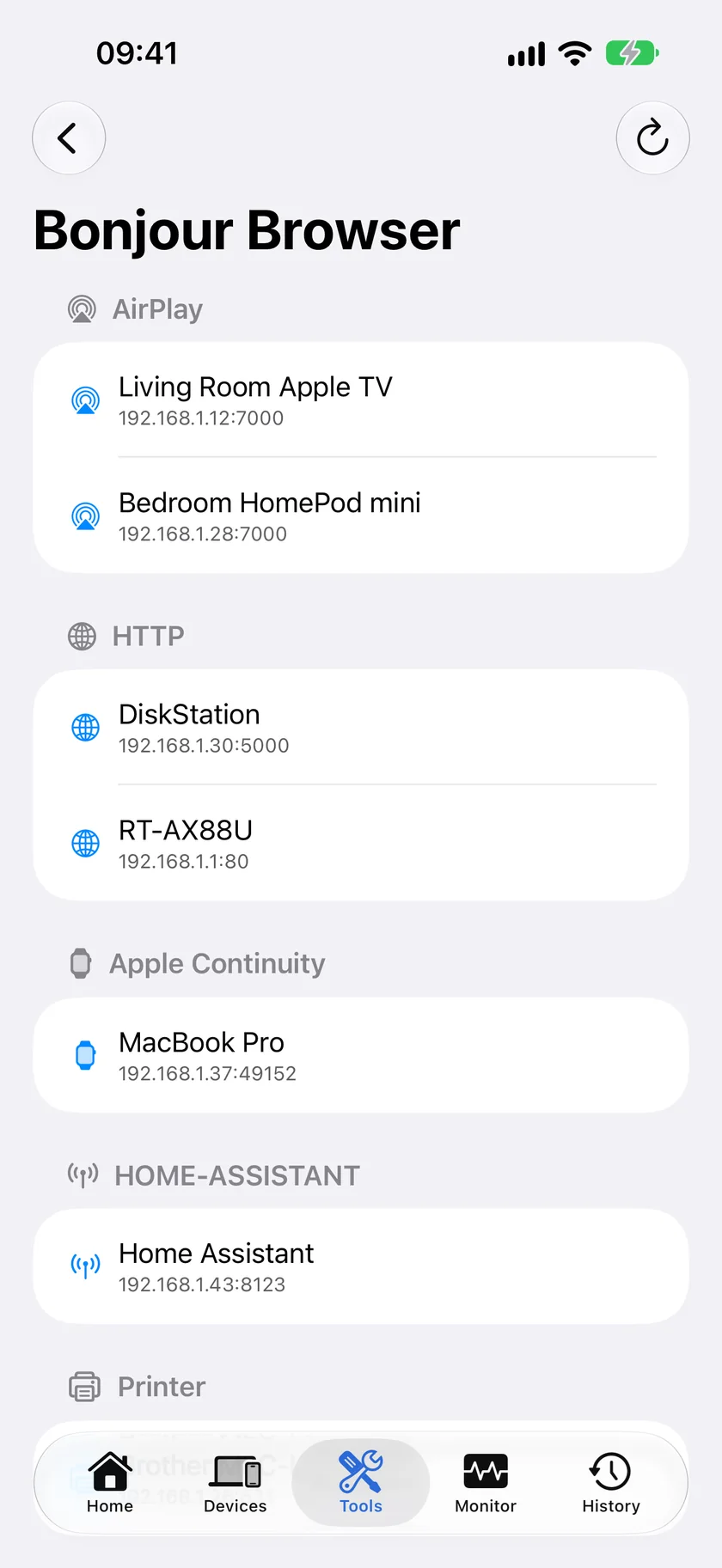
Our app. The pitch is breadth and a clean free tier: device discovery with signature-based classification, a port scanner for the devices on your network, a security scan with a score from 0 to 100, plus ping, traceroute, MTR, DNS lookup, SSL inspection, speed test, and more: 19 tools in all, free, with no ads, no account and no limit on scans. Scans run on the iPhone; what leaves it is what you choose to send for an AI answer or, with Guardian, a device lookup. AI explanations of a result are free too, from a weekly allowance. You never hit a paywall to run a scan.
The free PingKit Agent for Mac watches your network while the Mac is awake and sends its alerts to your Mac and your iPhone. Guardian ($2.99 a month on iPhone and on Mac) puts the Agent's devices and timeline in the iPhone app and adds Uptime Watch for ten sites, checked from PingKit's servers every five minutes.
Net Analyzer
A long-standing, technically deep option with a one-time purchase. The Pro tier unlocks the full feature set. A good pick for users who want detailed LAN and Bonjour analysis and don't mind paying for the advanced tools. Full head-to-head: PingKit vs Network Analyzer →
iNet
Polished scanner with service detection, popular with Mac users who also run the desktop version. Free tier is limited; the paid version unlocks the full device and service detail. Full head-to-head: PingKit vs iNet →
Scany
A compact iPhone scanner known for hidden-device detection and a solid set of one-time-purchase diagnostics. Full head-to-head: PingKit vs Scany →
IP Scanner
Clean, focused LAN scanner. The free tier limits the number of devices it will display; you unlock the full list with a purchase. Good if you want a simple, single-purpose scanner.
What No iPhone App Can Show You
Fing's description promises MAC addresses, and so do lists of Fing alternatives. On an iPhone, no app can show them. iOS answers every app that asks for another device's MAC address with the same placeholder, 02:00:00:00:00:00, so Fing, PingKit and every other scanner on the App Store get the same nothing. What you see instead is a name worked out from what the device announces about itself: Bonjour, SSDP and its hostname.
If you need the real addresses, read them from your router's device list, or use a Mac. The free PingKit Agent reads them on macOS 15 and 26 (macOS 27 hides them from apps, so there the router's list is the answer), and with Guardian the iPhone app shows the Mac's readings. Fing gets them the same way, through Fing Desktop or Fing Agent.
Fing on a Mac: the Desktop and Agent Alternatives
The phone alone does not monitor a network, whichever app you use, because iOS gives an app no background time to keep scanning. Fing's answer is Fing Desktop, which reports only while the computer is on, or Fing Agent on a Raspberry Pi, a Docker host or a NAS, which needs a paid plan. PingKit's answer is the free PingKit Agent, a Mac menu bar app that watches your network while the Mac is awake and stops while it sleeps, which is the same limit as Fing Desktop. PingKit has no headless agent for a Pi; if you want true round-the-clock coverage without a Mac that stays awake, Fing Agent is the one that offers it. Details: Fing Desktop alternatives for Mac and Fing Agent alternatives. Get PingKit Agent free on the Mac App Store.
What Fing Charges For, and What PingKit Charges For
Fing's prices are from its App Store listing and fing.com/pricing, read on October 3, 2026, in US dollars. They change, so check before you buy.
| Plan | Price | What it adds |
|---|---|---|
| Fing, free | $0 | Up to 3 scans a day, speed tests, tools; ads |
| Fing ads-free | $0.99 for 3 months, $2.49 a year | Removes the ads only |
| Fing Starter | $3.99 a month, $39.99 a year | Unlimited scans, device alerts, a 7-day timeline (App Store only) |
| Fing Premium | $7.99 a month, $69.99 a year | Continuous monitoring, blocking, 2 networks; needs Fing Desktop or Fing Agent |
| Fing Professional | $16.99 a month, $149.99 a year | Workspaces, several users, 3 or more networks |
| PingKit, free | $0 | All 19 tools, unlimited, no ads; the Mac Agent and its alerts |
| PingKit Guardian | $2.99 a month, $24.99 a year, iPhone and Mac | The Mac Agent's devices and timeline on iPhone, Uptime Watch for 10 sites, Cert Monitor for 5 domains |
| PingKit Guardian Plus | $9.99 a month or $79.99 a year on iPhone; $4.99 or $39.99 on Mac | Cert Monitor for 50 domains, alerts by email and webhook, the compliance PDF |
Every PingKit plan has a one-week free trial. The fair comparison is Guardian against Fing Starter, not Premium: Premium's device blocking has no PingKit equivalent, because PingKit does not block devices. For several networks, compare Guardian Plus, which shows up to five Macs in the iPhone app. Fing Premium vs PingKit Guardian puts the two subscriptions side by side.
Open Source Alternatives to Fing
The open-source tools people mean are desktop programs. Nmap (with its Zenmap interface) and Angry IP Scanner run on Windows, macOS and Linux, and neither has an iPhone app. On a Mac they are the right choice when you want scripted or very large scans. On an iPhone, the realistic free option is a free app, and the posts linked here show which PingKit tool covers which part of each.
Which Should You Pick?
- Want the broadest free toolkit with no ads: PingKit.
- Want the best raw device identification and don't mind ads or a scan limit: Fing.
- Want deep technical detail and will pay for Pro: Net Analyzer or iNet.
- Want a simple single-purpose scanner: IP Scanner.
Privacy note. If keeping your network map off third-party servers matters to you, check each app's data policy. PingKit keeps the iPhone's scans on the iPhone, and the Mac Agent's data syncs only through your private iCloud database, which the developer cannot read.
Frequently Asked Questions
Is Fing free?
The Fing app is free to download, with up to three scans a day on the free tier and ads, which a separate purchase removes (from $0.99 for three months). Unlimited scans and alerts start with Fing Starter at $3.99 a month, and continuous monitoring with Premium at $7.99 a month, which also needs Fing Desktop or Fing Agent running. Prices as of October 2026.
Is there a free app like Fing with no ads?
Yes. PingKit gives you device discovery, a port scanner for your own network, a security scan and 16 more tools, free, with no ads, no account and no limit on scans. The optional Guardian subscription is not needed to scan your network.
Do I need an account?
Not for PingKit, on iPhone or Mac. Its Mac Agent syncs to your iPhone through your own private iCloud database. Fing ties its monitoring and multi-device features to a Fing account.
Can any iPhone app show MAC addresses?
No. iOS gives every app the same placeholder, 02:00:00:00:00:00, for another device's MAC address, so no scanner on the App Store can show the real one. Read it from your router's device list, or from a Mac: the free PingKit Agent reads MAC addresses on macOS 15 and 26.
Can my iPhone watch my network while I am away?
Not on its own: iOS gives apps no background time to scan. Something at home has to do it. With PingKit that is the free Mac Agent, while the Mac is awake, and its alerts reach your iPhone. Websites are different: Uptime Watch checks them from PingKit's servers, one URL hourly for free, ten every five minutes with Guardian.
Can these apps see devices on a network I'm not connected to?
No. An iPhone network scanner can only scan the local network it is currently joined to. To look at another network, you need to be on it.
What replaced Fingbox?
Fingbox is discontinued. Fing describes Fing Agent, software for a Raspberry Pi, a Docker host or a NAS on a paid plan, as its successor, and Fing Desktop does the same job while a computer is on. PingKit's equivalent is the free Mac Agent, on a Mac that stays awake, with no hardware to buy.
Try the Free Alternative
PingKit scans your network, names devices from what they announce and from vendor and protocol signatures, and bundles 18 more tools: free, no ads, no account.
Download PingKit FreeRelated Articles
- Fing Premium vs PingKit Guardian: What Each Subscription Monitors
- Best Network Monitoring Apps for iPhone: Which Ones Actually Alert You
- How to Detect Unknown Devices on Your WiFi
- The 10 Best Network Tools for iPhone
- Is Someone Stealing My WiFi?
- PingKit vs Fing: Head-to-Head Comparison
- Fingbox Alternatives Without the Hardware
- Net Analyzer Alternatives for iPhone
- LAN Scanner for iPhone
- Roku Not Showing Up on Network: Find It From Your iPhone