Best Network & LAN Scanner Apps for iPhone (2026)
"Network scanner," "LAN scanner," and "IP scanner" are mostly the same search for the same thing: an app that lists every device connected to your WiFi. We make one of the apps below, so keep that in mind, but every price and feature here is checked against each app's current listing rather than assumed.
The question that actually matters: do you want an app you open and tap "scan," or one that watches continuously and tells you the moment something changes? Most of the apps below are the first kind. Only two do the second.
At a Glance
| App | Background monitoring? | Ads | Price |
|---|---|---|---|
| PingKit | Yes, free, while a Mac is awake | None | Free + optional $2.99/mo |
| Fing | Yes (Premium) | Free tier | Free + $7.99–16.99/mo |
| iNet | No | Varies | Free; Pro $9.99 iOS / $24.99 Mac |
| Scany | No | None | ~$3.99–5.99 one-time |
| LanScan | No | None | Free; Pro $5.99–14.99 |
| WiFiman | No | None | Free |
| NetSpot | No | Free tier | Free + Plus from $8.99/mo |
PingKit
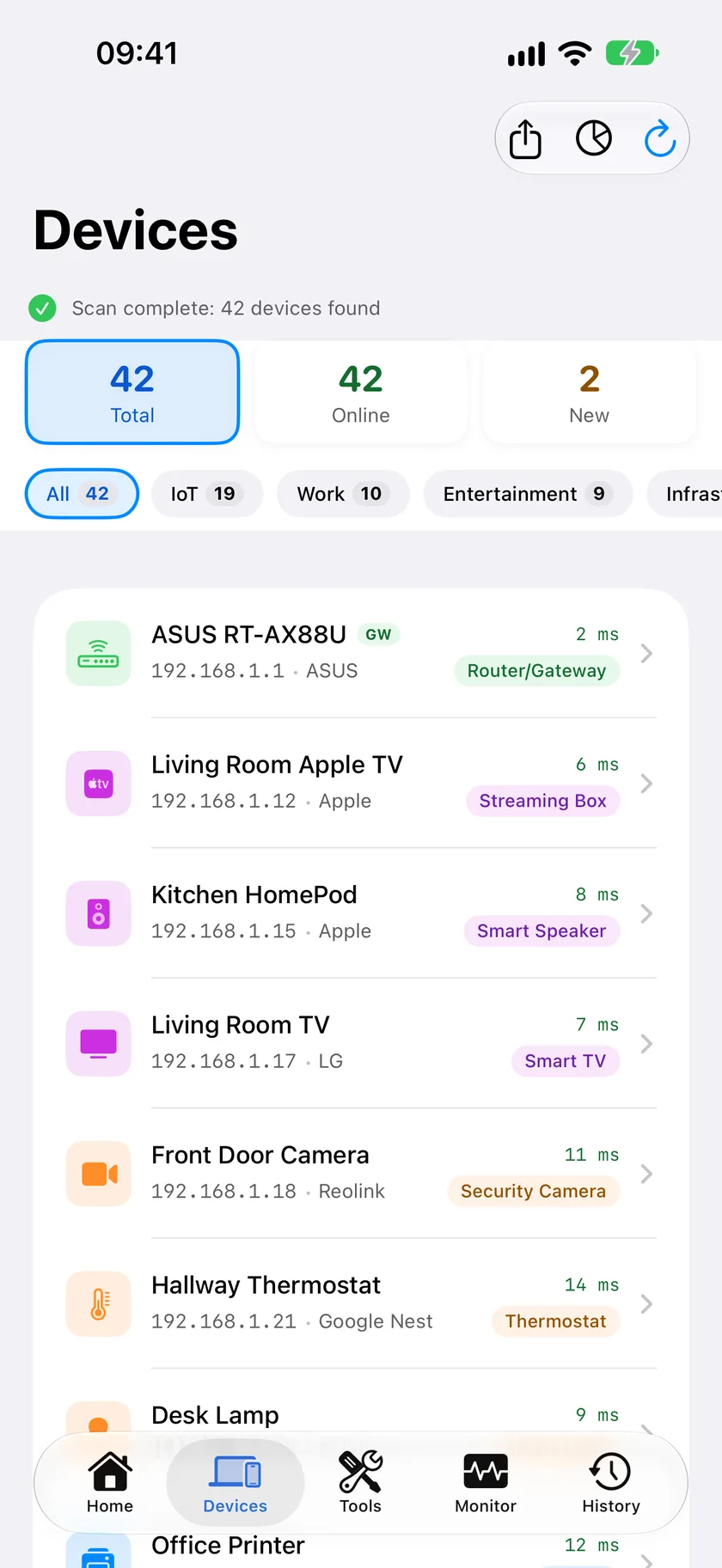
Our app. LAN Scanner discovers every device on your network with vendor and protocol signature matching helping identify what it can, and it's one of 19 free tools including security scanning, port scanning, and SSL inspection - all free, no ads, no account. The free Mac Agent adds background monitoring and new-device alerts whenever your Mac is awake, and the optional Guardian subscription ($2.99/mo) adds its dashboard to the iPhone app.
Fing
The most popular network scanner on the App Store, with the largest device-identification database in the category. The free tier carries ads; continuous monitoring and device blocking require Fing Premium ($7.99/mo) or Professional ($16.99/mo), paired with the Fing Desktop or Agent software.
iNet Network Scanner
A long-standing Apple-ecosystem app with a tidy device list, custom naming, and solid Wake-on-LAN and connection shortcuts (SSH, VNC, HTTP). Its iPhone and Mac apps are separate, without iCloud sync between them as of mid-2026.
Scany
A focused, one-time-purchase iPhone scanner with a reputation for finding devices that try to stay hidden. iOS-only, and strictly on-demand - open it, scan, close it.
LanScan
A fast, minimal Mac-only scanner, free to start with a Pro tier adding IPv6 support. Its "live scan" mode refreshes while the window is open but stops the moment you close it.
WiFiman
Ubiquiti's free app, rated 4.8 stars across roughly 39,000 reviews. Device scanning and speed test work on any network, but its standout features - AP channel optimization and Teleport VPN access - only apply if you own UniFi hardware. See our full PingKit vs WiFiman comparison.
NetSpot
Device discovery, ping, and speed test are free; its real draw, a visual WiFi coverage heatmap, sits behind NetSpot Plus ($8.99/mo or $29.99 lifetime). More a WiFi survey tool than a pure device scanner. Full comparison: PingKit vs NetSpot.
Which Should You Choose?
- Want the biggest device-ID database and don't mind ads: Fing.
- Want a one-time-purchase Mac scanner: iNet or LanScan.
- Want a one-time-purchase iPhone scanner built to find hidden devices: Scany.
- Own Ubiquiti UniFi gear: WiFiman, for its free AP tools.
- Need a visual WiFi heatmap: NetSpot Plus.
- Want the widest free toolkit with no ads, plus continuous monitoring: PingKit, with the free Mac Agent on a Mac that stays awake.
Frequently Asked Questions
What is the best free network scanner app for iPhone?
PingKit and WiFiman are both fully free with no ads. Fing, iNet, Scany, LanScan, and NetSpot offer free scanning but paywall deeper features.
Which network scanner app monitors 24/7, not just on demand?
PingKit (the free Mac Agent, no subscription, on a Mac that stays awake) and Fing (Fing Desktop/Agent + Premium, $7.99/mo) both offer continuous background monitoring. The rest are on-demand scanners.
What's the difference between a network scanner and a WiFi analyzer?
A network scanner finds devices on your network; a WiFi analyzer measures connection quality, and signal strength where the platform allows it, which iOS does not. PingKit, Fing, and NetSpot include both.
Scan Your Network Free
PingKit finds every device on your WiFi, plus 18 more free tools - no ads, no account.
Download PingKit FreeRelated Articles
- Best Network Monitoring Apps for iPhone: Which Ones Actually Alert You
- How to Find All Devices on Your WiFi Network
- PingKit vs Fing
- The Best Network Tools for iPhone
- Is Someone Stealing My WiFi?
- Advanced IP Scanner for iPhone and Mac
- Angry IP Scanner for iPhone: iOS Equivalents
- Net Analyzer Alternatives for iPhone
- Scany Alternatives for iPhone
- SoftPerfect Network Scanner: The iOS Equivalent
- LAN Scanner for iPhone
- How PingKit compares to other network tools
- Find Your Raspberry Pi's IP Address From an iPhone
- AirPrint Printer Not Found on iPhone: Is It on the Network?
- Roku Not Showing Up on Network: Find It From Your iPhone