How to Prove Your Internet Keeps Dropping
"It feels slow sometimes" gets nowhere with an ISP support line, and it gets nowhere with a landlord either. The problem with intermittent connection issues is that they're intermittent, by the time you're on the phone describing it, the connection has usually recovered and everything looks fine on their end. What actually moves the conversation is a timestamped record showing exactly when the drops happened and how bad they were.
Why "It Feels Slow Sometimes" Doesn't Work
ISP support scripts are built around remote diagnostics that check your line and modem status at the moment you call. If the fault isn't actively happening, those checks come back clean, and you get told to restart your router. This isn't necessarily stonewalling, it's just that a snapshot taken after the fact can't see a problem that already passed. You need a record captured while it's happening, not a description of it afterward.
What Actually Counts as Evidence
Three things make a connection problem credible to someone who wasn't there when it happened:
- A timestamp - exactly when the drop or spike occurred, ideally down to the minute.
- A number - latency in milliseconds, or a clear "connection lost" event, not a subjective description.
- A pattern - whether it happens at the same time each day, in the same room, or randomly. A pattern points to a specific cause and is much harder to dismiss than a one-off complaint.
How to Log Your Connection with PingKit
- Open PingKit and go to Connection Monitor.
- Start monitoring. PingKit pings a reliable server continuously and plots the response time on a live, scrolling graph.
- Watch the stability score, a 0-100 number computed from the latency readings. A steady connection holds near 100. Spikes and timeouts pull it down in real time.
- Keep the app open during the window you're troubleshooting. When you see a drop or a spike on the graph, take a screenshot, that's your timestamped evidence.
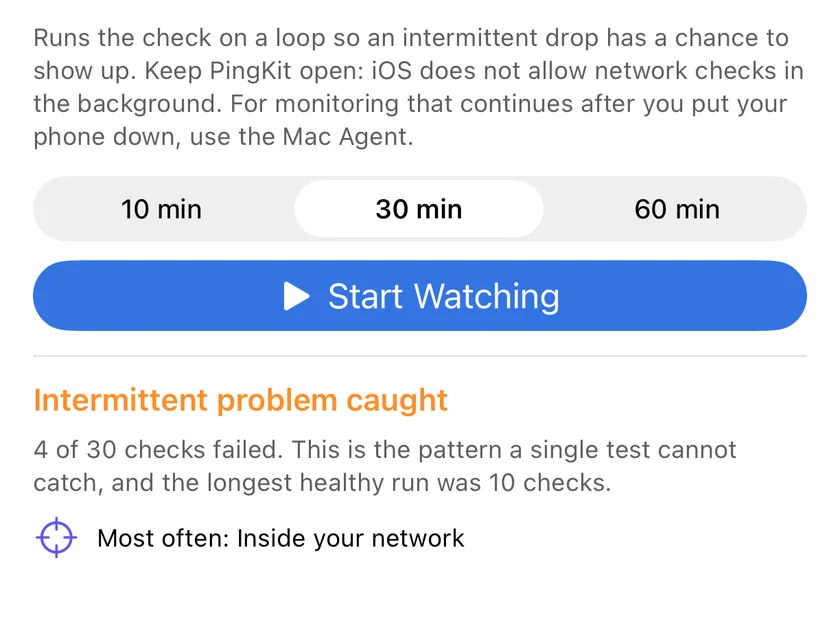
Foreground only, by design. Connection Monitor tracks your connection while the app is open and on screen, the way iOS expects a network diagnostic tool to behave. It doesn't run silently in the background or auto-export a report, so plan to have it open during the hours the problem tends to happen, evenings for streaming buffering, mornings for video call drops, whatever your pattern is.
Finding the Pattern
Once you've got a few sessions logged, look for when the drops cluster:
- Same time every day - usually neighborhood congestion (everyone streams at 8pm) or a scheduled process on your own network (a backup job, a router reboot script).
- Only in certain rooms - a WiFi coverage problem, not an ISP problem. See the walk test below before you call anyone.
- Random, no pattern, everywhere in the house - most consistent with an upstream ISP or hardware issue, and the strongest case for escalating.
Rule Out Your Own WiFi First
Before you point the finger at your ISP, walk around your home with Connection Monitor running. If the stability score only tanks in the back bedroom but holds fine everywhere else, that's a coverage problem you can fix with router placement or a mesh extender, not something an ISP ticket will resolve. If the score drops even standing next to the router, the problem isn't WiFi coverage.
What to Send Your ISP
Screenshots of the Connection Monitor graph showing the actual spike or timeout, each with a visible time. A short written summary: "Connection drops most evenings between 7 and 9pm, stability score falls from 95+ to under 40, happens in every room including next to the router." If you've also run repeated Ping Test checks, those save to PingKit's History automatically, giving you a second timestamped source without extra effort.
This is the same record that's useful for a landlord dispute over an advertised "high-speed internet included" unit, or for deciding whether you're within your rights to cancel a contract under a service-level guarantee. A specific, timestamped pattern is much harder to wave away than a general complaint.
When to Escalate
If you've logged a clear pattern over several days and the first-line support reset didn't fix it, ask specifically for a line-quality check or a technician dispatch, reference your logged times. Most ISPs have an internal escalation path for repeat callers with specific evidence that skips the generic troubleshooting script entirely.
Frequently Asked Questions
How do I prove my internet connection is unreliable?
Run Connection Monitor during the hours the problem happens and screenshot the graph when you catch a drop or spike. A timestamped record beats a description after the fact.
Does Connection Monitor run in the background and save a log automatically?
No. It tracks your connection continuously while the app is open, in line with what iOS allows a foreground app to do. Keep it open during the window you're troubleshooting and screenshot when you see a problem.
What should I send my ISP as evidence?
Screenshots of the graph with visible timestamps, plus a short note on the pattern (time of day, specific rooms, or random). Saved Ping Test results in PingKit's History give you a second timestamped source.
How do I tell if it's my WiFi or my ISP?
Walk around with Connection Monitor running. Drops confined to specific rooms point to WiFi coverage. Drops everywhere, including next to the router, point upstream.
Is PingKit's Connection Monitor free?
Yes. Connection Monitor and all 19 tools are free, with no ads and no account required.
Start Building Your Record
PingKit's Connection Monitor tracks latency and stability in real time, alongside 18 more free network tools.
Download PingKit FreeRelated Articles
- Catch an Intermittent Internet Drop on iPhone
- Network Reports and Evidence PDFs
- Why Does My Internet Keep Disconnecting? How to Fix It
- How to Tell If Your ISP Is Throttling You
- How to Fix Slow WiFi on iPhone
- Best Uptime Monitoring Apps for iPhone
- Is Your Business WiFi Down? A No-IT-Department Checklist
- Is It Your WiFi, Your Router, or Your ISP?
- How to Prove Internet Drops to Your ISP: A Mac Guide
- Internet Connection Monitor for iPhone and Mac
- Starlink Keeps Dropping: How to Log the Outages as Evidence
- Continuous Ping Test on iPhone: What Is Actually Possible
- Nintendo Switch Keeps Disconnecting From WiFi: Find the Cause