PingKit vs Uptime Kuma
A different kind of comparison than PingKit's other uptime-monitoring match-ups: Uptime Kuma isn't a company selling a plan, it's free, open-source software you run yourself. The trade-off isn't features versus price, it's capability versus maintenance.
Uptime Kuma is one of the most popular self-hosted monitoring tools on GitHub (84,000+ stars as of 2026), typically run in Docker on a home server, NAS, or VPS. PingKit's Uptime Watch is one feature inside a free iPhone/Mac network toolkit. We make PingKit, so weigh that accordingly, but every claim below is checked against Uptime Kuma's own documentation and PingKit's shipped feature set.
Feature-by-Feature
| Capability | PingKit (Guardian) | Uptime Kuma |
|---|---|---|
| Monitors | Up to 10 URLs or TCP ports | Unlimited |
| Check interval | Every 5 minutes (hourly on the free tier) | As low as 20 seconds |
| Monitor types | HTTP(S) URL, with an optional keyword or expected status code; TCP port | HTTP(S), TCP port, DNS record, ping, Docker container, keyword match, push |
| Notification channels | Push notification (iOS/Mac); email and one webhook with Guardian Plus | 90+ (Slack, Discord, Telegram, email, webhooks, and more) |
| Public status page | Not offered | Yes, free and built in |
| Cost | $2.99/mo (Guardian) | $0 software (you provide hosting) |
| Setup required | Download from the App Store | Docker/VPS setup, ongoing updates and patching |
| First-party native mobile app | Yes, iOS and Mac | No (web dashboard; unofficial third-party apps exist) |
| Device discovery, port scan, DNS, security scan, 15 more tools | Yes, free | Not offered, single-purpose tool |
Where Uptime Kuma Wins
If you're comfortable running a Docker container and keeping it patched, Uptime Kuma is simply more capable: unlimited monitors, checks as frequent as every 20 seconds, many more monitor types (DNS, ping, Docker and push among them), a free public status page, and 90+ notification integrations that put PingKit's three channels to shame: push, plus email and one webhook on Guardian Plus. It's free software with no subscription, ever, and your monitoring data lives entirely on infrastructure you control. For a homelab or self-hosting enthusiast who already runs other services, adding one more container is a small ask for a lot of capability.
Where PingKit Wins
The thing Uptime Kuma doesn't solve is who monitors the monitor. If you run it on the same home server or network it's watching, an outage there can silently take your alerting down with it, the exact failure you set it up to catch. Hosting it separately (a cheap VPS) fixes that, but now you're paying for and maintaining a second always-on service, plus keeping it updated for security patches, indefinitely. PingKit's Uptime Watch has none of that: no server to provision, patch, or lose track of, just a toggle in an app you already have installed, and it sits alongside LAN Scanner, Wake-on-LAN, Port Scanner, and 15 more tools most self-hosters would reach for anyway.
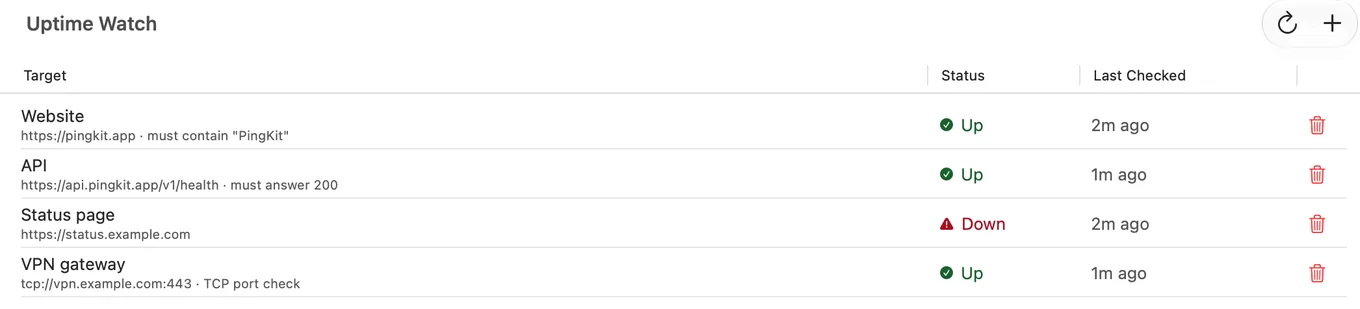
Uptime Watch has its own page now: checks from Cloudflare, one URL free permanently and checked hourly, ten URLs or TCP ports with Guardian and checked every five minutes. And if the question is really about the phone, Uptime Kuma on iPhone lists what actually works.
The honest trade-off: on Guardian an outage could run up to five minutes before Uptime Watch notices, and up to an hour on the free tier, versus Uptime Kuma's 20-second interval. If minutes matter, or you want status pages and rich integrations, Uptime Kuma is the stronger tool, and the "maintenance cost" of running it is genuinely small for anyone already comfortable with Docker.
Which Should You Choose?
- Already self-hosting other services, comfortable with Docker, want maximum capability for free: Uptime Kuma.
- Want to watch a home server/NAS/side project with zero setup and nothing new to maintain: Uptime Watch is one toggle, not a second service to run.
- Want the rest of PingKit's toolkit regardless: Download PingKit free, Uptime Watch is optional, the other 18 tools aren't gated.
More Comparisons
- PingKit vs UptimeRobot
- PingKit vs Pingdom
- PingKit vs PingPlotter
- PingKit vs Wireshark
- Uptime Kuma on iPhone (2026): There Is No App, Here Is What Works
- Uptime Kuma Alternatives for Mac (2026): Uptime Monitoring Without a Server
- Every PingKit comparison
Try PingKit Free
19 network tools, no ads, no account. One Uptime Watch URL is free permanently; Guardian at $2.99/mo unlocks 10 URLs and 2 more features.
Download PingKit FreeUptime Kuma says green. Is the stack patched?
apt upgrade does not touch Plex, Jellyfin, Grafana or Portainer, so every service a dashboard reports as healthy can still be months behind. Noxen, our sister Mac app, audits Linux and VPS hosts nightly over SSH and matches what is installed against a signed daily CVE feed. PingKit tells you whether a service is reachable; Noxen tells you whether the host behind it is current.
The patching gap for self-hosted services →